Autoblocking is Cookie Compliance’s consent-first safeguard. It pauses non-essential scripts and iframes until a visitor makes a choice, then only allows what aligns with that choice to run. This holds back pre-consent tracking (subject to the two limits described below), keeps analytics and ads honest, and helps you meet prior-consent obligations. Think of it as a gate that opens only for what a user has actually agreed to—nothing more.
How it works, conceptually
When a page loads, Cookie Compliance looks for third-party Providers (analytics, ads, media embeds, widgets). Until there’s valid consent, those Providers are held: they don’t execute, so their code sets no cookies and sends no tracking data. The browser may still download a held script file, but it does not run. Two limits: a script that an already-allowed script adds later is not held (for example a tag that Google Tag Manager fires while Google Consent Mode lets GTM run, so gate those inside GTM), and on the Free plan blocking stops once the site passes its visit limit for the current cycle. After a choice is recorded, the system “releases” only the Providers that match the accepted Purpose Categories. Withdrawals or changes are saved immediately—held Providers stay held, and Providers that already ran keep running until the next page load, when only those matching the new choice are released. Turn on Reloading to reload the page as soon as the new choice is saved. This applies to traditional sites and modern SPAs alike, so late-loaded components don’t sneak past consent.
Two controls, not one
From plugin version 3.1.10 onward, autoblocking is governed by two separate switches, not one. Both live in WordPress admin → Compliance → Cookie Consent tab (classic settings screen: Cookie Consent Settings). Checking only one of them is the most common reason autoblocking appears not to be working.
- Script blocking engine — the master switch. Turn this off and Cookie Compliance never touches your scripts: nothing is blocked for any visitor, in any region, regardless of privacy signals. Leave it on unless you handle script blocking yourself.
- Autoblocking — block before consent. Holds third-party scripts until the visitor makes a choice. With this off, scripts load immediately; once the visitor chooses, their choice is enforced either way.
The engine gates the posture, so Autoblocking does nothing while the engine is off — the plugin shows this on the Autoblocking card as “No effect while the script blocking engine is off.” If third-party scripts are firing before consent, check the engine first: with Autoblocking off you still lose only the pre-consent window, but with the engine off nothing is enforced at any point.
Both switches live in the WordPress plugin. The Admin Portal at app.hu-manity.co also has Site-wide autoblocking (Configuration → Laws), which WordPress sites running plugin 3.1.11 or later pick up; the Script blocking engine is in the plugin only. On a snippet install the Portal setting has no effect. On a site that uses the pasted snippet instead of the plugin, the engine is controlled by the blockingEngine key in the snippet itself — see Where to put the Cookie Compliance snippet.
Purpose Categories & Access Levels (the core model)
Cookie Compliance uses a small, consistent set of Purpose Categories to describe why a Provider runs. Typical categories include:
- Basic Operations — essential functions required for the site to work (not subject to autoblocking).
- Site Optimization — analytics, performance measurement, A/B testing.
- Content Personalization — recommendations, embedded media behavior, UX tailoring.
- Ad Personalization — advertising, audience building, cross-site tracking.
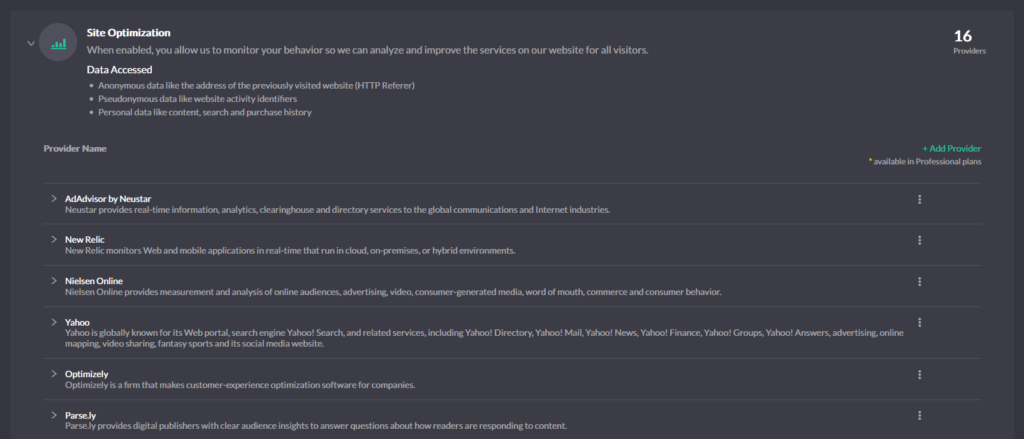
These categories power everything: the banner text, what’s allowed to run, and what’s recorded in your consent logs. They’re also what make consent portable across pages and sessions—if a visitor accepts “Site Optimization,” any matching Provider can run, while others remain blocked.
On top of categories, the banner offers Access Levels that provide quick, understandable defaults:
- Private — the highest-privacy experience. Only Basic Operations run. Everything else stays blocked unless the visitor later opts in.
- Balanced — a pragmatic middle ground. Content Personalization and Site Optimization may run, while Ad Personalization remains off unless explicitly accepted.
- Personalized — the most feature-rich experience. Content Personalization and Ad Personalization are enabled together with Site Optimization, giving visitors full personalization and marketing features.
Access Levels are simply presets over the Purpose Categories, expressed in plain language so visitors understand the tradeoffs. Whether someone taps “Private,” “Balanced,” or “Personalized,” autoblocking enforces that choice by mapping it to the underlying purposes and only unblocking Providers that fit.
Signals and scope (just what you need)
The banner is the source of truth for user choices; Autoblocking enforces those choices at runtime. Where enabled, consent modes—Google Consent Mode, Meta (Facebook) Consent Mode, and Microsoft Consent Mode—read the standardized consent signals so their tags degrade gracefully before consent and upgrade after consent. These modes complement, not replace, autoblocking. If Global Privacy Control (GPC) is honored in your setup, autoblocking also treats it as an opt-out: every non-essential purpose stays held.
What to expect (practical boundaries)
Most common Providers are recognized out of the box. Self-hosted or uncommon loaders may need a precise URL pattern so they’re identified correctly. Inline or obfuscated tags can obscure detection; transparent integration yields the most reliable results. Basic Operations are never blocked; everything else follows the consent model you expose in the banner. The goal is consistency: the wording visitors see, the purposes you configure, what actually runs, and what gets logged all line up.
Key Terminology
- Provider — a third-party service such as analytics, ads, media, or widgets.
- URL pattern — the match rule used to recognize a Provider’s script/iframe/endpoint.
- Purpose Category — the why behind a Provider (e.g., Site Optimization); governs unblocking.
- Access Level — a preset that toggles multiple purposes at once (Private, Balanced, Personalized).
- Consent signals / Consent Modes — standardized flags read by some platforms to adapt behavior.
That’s the big picture. Autoblocking guards the door; Purpose Categories define the rules; Access Levels make the decision simple for visitors—so what runs always reflects what was actually agreed to.