Global Privacy Control (GPC) is a browser signal indicating the visitor’s preference to opt out of sale/sharing and similar tracking. When you enable GPC support in Cookie Compliance, the signal is honored before any interaction: the session starts in a protected state where every non-essential purpose is held off. By default the visitor sees no consent banner: Cookie Compliance records a Private choice for them and shows a brief notice. If you choose Show full banner, the banner still appears and the visitor can choose Private, Balanced, or Personalized—but until they explicitly opt in, every non-essential purpose stays off. (In Show full banner mode, if Consent on Scroll, Click or Close is on, scrolling, clicking or closing the banner saves the preselected Default Consent Level as that choice. This applies to the Classic engine; the New engine preselects nothing.)
Why GPC Matters
In the context of privacy regulations, GPC is particularly relevant under:
California Privacy Laws (CCPA/CPRA)
The CPRA (California Privacy Rights Act) explicitly states that businesses must honor a user-enabled Global Privacy Control. Ignoring GPC when it is enabled can be considered a violation of the law.
EU GDPR (General Data Protection Regulation)
While not officially recognized under GDPR yet, GPC aligns with GDPR’s principles of consent and data minimization. It could, in the future, be interpreted as a signal of consent refusal, especially if implemented in a clear and informed manner.
Other US State Privacy Laws
Some laws (e.g., Colorado Privacy Act, Connecticut Data Privacy Act) will require businesses to honor universal opt-out mechanisms, which could include GPC.
How it fits with Purpose Categories and Access Levels
GPC is not a geofence and not consent by itself; it’s a preference signal. It acts before any user interaction and narrows what’s allowed by default:
- Purpose Categories — GPC holds every non-essential category off: only Basic Operations run, and Content Personalization, Site Optimization and Ad Personalization stay off.
- Access Levels — With the default passive notice, or Silent, there is no banner and a Private choice is recorded for the visitor. With Show full banner, the visitor can still choose Private, Balanced, or Personalized, and their choice applies. (In Show full banner mode, if Consent on Scroll, Click or Close is on, scrolling, clicking or closing the banner saves the preselected Default Consent Level as that choice. This applies to the Classic engine; the New engine preselects nothing.)
This keeps the model simple: GPC sets the guardrails. With Show full banner, the visitor’s selection makes the final call; with the default passive notice or Silent, a Private choice is recorded without the visitor choosing.
Enable GPC support
How to activate:
- Go to Configuration and open Consent Signals.
- Toggle GPC Support On.
- Click Publish Now.
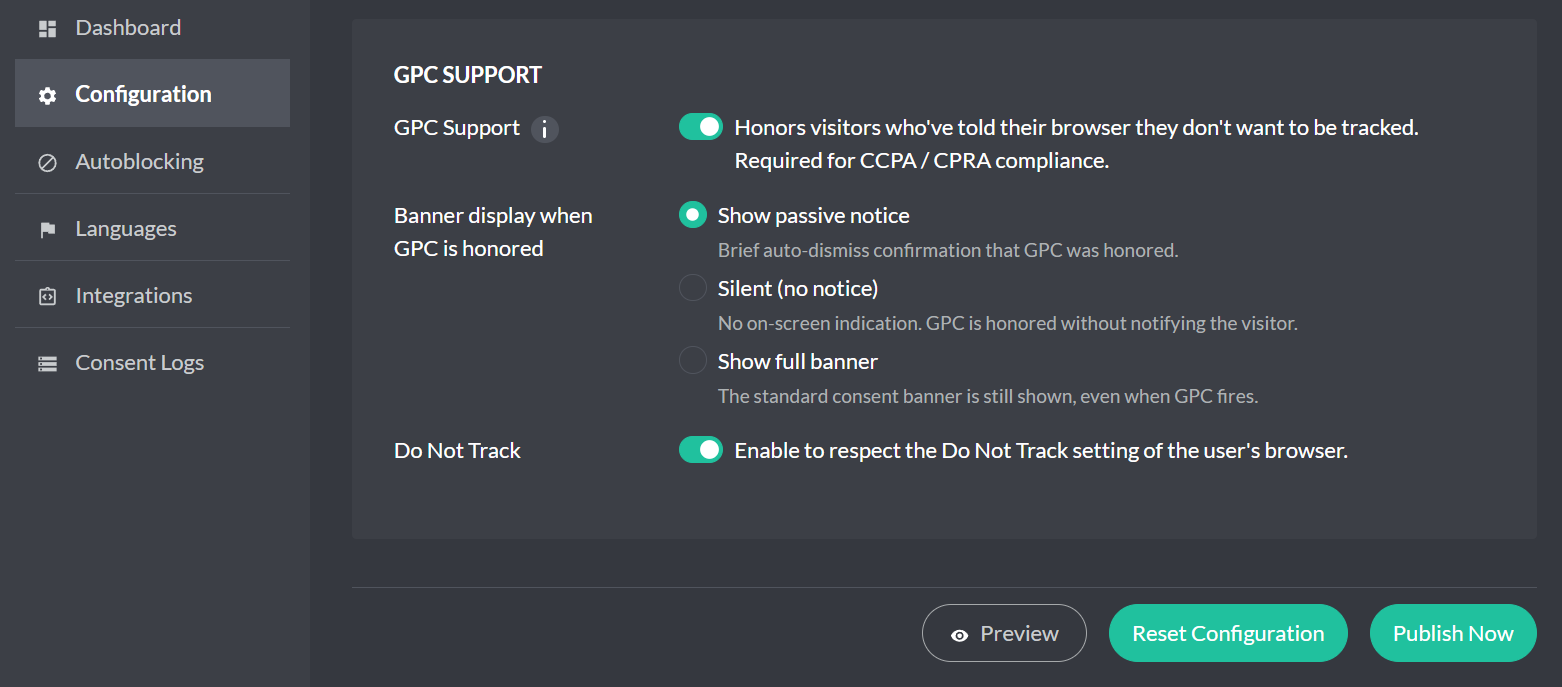
What this toggle does:
- When a browser sends a Global Privacy Control (GPC) signal, Cookie Compliance treats it as an opt-out preference and starts with a conservative default: every non-essential category (Content Personalization, Site Optimization and Ad Personalization) is off until the visitor explicitly opts in.
- What the visitor sees depends on the Banner display when GPC is honored setting. Show passive notice (the default) and Silent (no notice) show no consent banner and record a Private choice for the visitor; the passive notice briefly confirms that GPC was honored. It appears once, pinned to the bottom of the screen, on the page view where the signal set that Private choice. It closes when the visitor closes it, or after about 8 seconds. Later pages show only the Update consent icon, if you show one. Show full banner shows the banner as usual, with your Default Consent Level preselected (Classic engine; the New engine preselects nothing); the visitor’s selection takes precedence and is enforced by Autoblocking.
- Your configured consent modes (Google Consent Mode, Meta (Facebook) Consent Mode, Microsoft Consent Mode) read the same resulting consent state. Autoblocking’s usual limits still apply: a script that an already-allowed script adds later is not held (for example a tag Google Tag Manager fires while Google Consent Mode lets GTM run, so gate those inside GTM), and on the Free plan blocking stops once the site passes its visit limit for the current cycle.
What it does not do:
- It doesn’t change your Purpose Categories or your consent-mode mapping.
- It never grants consent on the visitor’s behalf; the only choice it records for them is Private.
Quick terminology
Global Privacy Control (GPC) — a browser signal indicating a user’s opt-out preference for sale/sharing and cross-site tracking.
Purpose Categories — the “why” behind a service (e.g., Basic Operations, Site Optimization, Content Personalization, Ad Personalization).
Access Levels — visitor-friendly presets over those purposes (Private, Balanced, Personalized).
Do Not Sell/Share — a U.S. opt-out concept some policies expose to visitors.