A Privacy Proof-of-Consent documents that a visitor submitted a form (e.g., registration, contact, policy acknowledgment) that included your privacy consent text/checkboxes. When the configured form is submitted, the banner captures a snapshot of what was shown and sends a Privacy Consent entry to the application. The export includes:
- the property/app ID, a pseudonymous user identifier, session ID, and a unique consent_id,
- identifiers (IP, optional email/subject if collected) — the full values are stored; see anonymization below,
- the form_id that produced the entry,
- any checked_preferences (when your form defines multiple consent checkboxes), and
- a proof field containing the HTML snapshot of the rendered form content.
Why this matters: the proof gives you the exact text and structure presented at submission time, tied to stable IDs (consent_id, form_id, session_id) so you can reference it in audits, DSR workflows, or vendor reviews—check an export for identifiers before you share it.
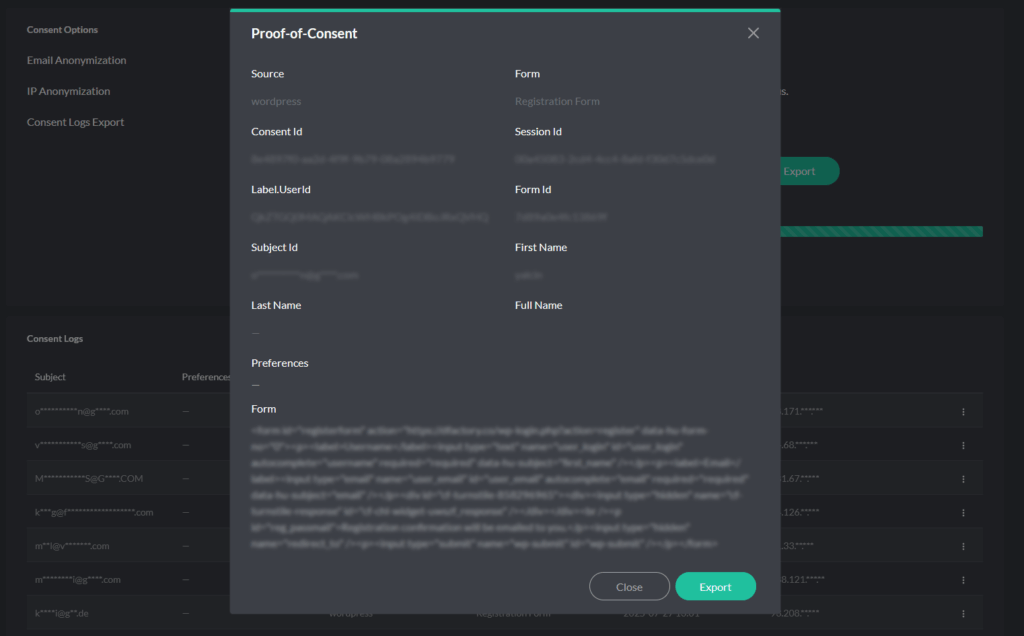
Generating a Proof-of-Consent
In the application, open Consent Logs and switch to Privacy Consent. Open the entry’s actions menu and choose Proof-of-Consent to view the record, then click Export for a CSV (the actions menu also has Export). With anonymization on, a single-entry export hides part of the ip_address and subject_id, but not full_name, proof or user_id; a date-range export hides nothing.
Proof-of-Consent export contents
A Privacy Proof-of-Consent export includes:
- app_id — property/app identifier.
- user_id — a pseudonymous identifier derived from the subject’s email; treat it as personal data.
- form_id — a fingerprint of the form’s HTML at submission time; the same form markup gives the same form_id, and any change to the markup gives a new one.
- session_id — browser session identifier at submission time.
- consent_id — unique identifier for this consent record (primary key for correlation).
- ip_address — the full IP is stored; with IP anonymization on, the logs view and a single-entry export hide part of it, but a date-range export does not.
- subject_id — subject identifier if collected (e.g., email); with email anonymization on, the logs view and a single-entry export hide part of it, but a date-range export does not.
- full_name — present only when the form collects it.
- checked_preferences — selections within the privacy form when multiple checkboxes exist.
- proof — HTML snapshot of the rendered form content at submission time.
What you use it for
- Audit evidence: show the exact notice text/form the visitor accepted, with timestamp and IDs.
- DSR/complaints: retrieve the precise record and the HTML proof for the individual in question.
- Vendor/legal reviews: provide a CSV that includes the proof markup. Check it before sharing: an export can contain the visitor’s IP address, email and name.